







- V1.1: Initial release
- V1.2: July 2008
- Improved output format
- Introduced several control switches:
- -w <angle>: Define warning angle threshold
- -t <angle>: Define error angle threshold
- -c: Automatically split warped quads into triangles
- -o: Do not create conditional lines when splitting quads
- V 1.3: October 2008
- Improved startup messages
- V 1.4: May 2010
- Corrected rounding set too low (4 significant digits)
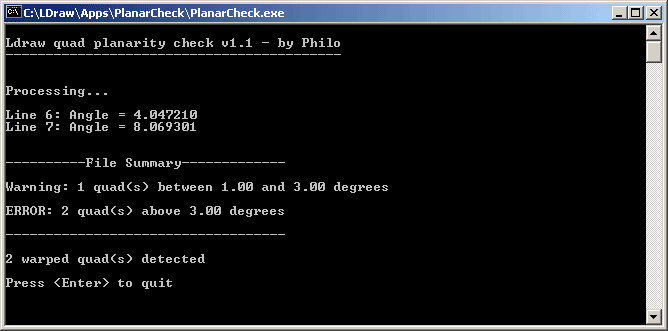
- The simplest way to use PlanarCheck is to drag and drop the LDraw file to check on a shortcut of the program. A Command Prompt window similar to the one below will open, showing the result.
- Another possibility is to use Michael Heidemann LETGUI front-end.
- Alternatively, you may also place a shortcut to PlanarCheck.exe in you SendTo folder (C:\Documents and Settings\<your_computer_user_name>\SendTo - warning, this folder is normally hidden!). Then right-click on the file to check and select SendTo > PlanarCheck context menu entry.
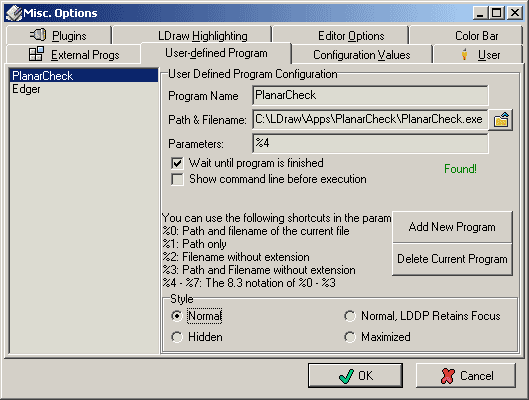
- More conveniently, you may also set up PlanarCheck as an external program to LDDesign Pad (LDDP). See the LDDP options screenshot below.
- Launch a command prompt
- Type the command line: PlanarCheck LdrawFile LdrawFileOut.
- When an output file is specified, a quad splitting suggestion is added as a comment when angle exceeds warning threshold:
4 11 10 0 0 10 0 10 20 0 10 20 0.5 0

0 Angle 4.047210> 1.000000

0 Suggested split:

0 3 11 10 0 0 10 0 10 20 0 10

0 3 11 10 0 0 20 0 10 20 0.5 0

0 5 24 10 0 0 20 0 10 10 0 10 20 0.5 0 - Threshold values can be modified if needed, using -t <angle> and -w <angle> command line options. Note that default values should not be changed for LDraw parts certification. A warning message is issued if you modify them. If warning threshold is higher than error threshold, both are set to error threshold value.
- Warped quad to triangle split will be performed automatically in output file if you specify the -c command line option. The split is done if warning threshold is exceeded.
- -o command line option prevent generation of a conditional line between split triangles.
|
PlanarCheck, LDraw Quad Coplanarity Checker

PlanarCheck helps you verify that all quads of a part file are planar enough to fulfill LDraw.org Parts Tracker requirements. While a triangle is always flat, a quad may be warped. This can yield weird rendering results, as exemplified by the center square in the image above (though the effect is generally much less apparent, the center square is VERY distorted for illustration purpose...).
Coplanarity verification was previously done using "Dist Coplanarity Check" and "Det Coplanarity Check" included in L3P or LDDP. Unfortunately these tools results were not simple to interpret, since Dist values are proportional to the size of the quad, and Det values are proportional to size3. PlanarCheck tries to overcome this issue by calculating the angle between the triangles composing the quad.
The coplanarity error threshold default is 3°, and a warning is issued for quads whose non-coplanarity exceeds 1°.
Download
PlanarCheck package, including program for Windows, documentation, source files (Visual C++ 6.0), sample files.

Note: Macintosh version (universal binary) courtesy of Jim DeVona.
History
Usage
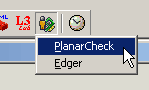
PlanarCheck can then be used on the currently active file in LDDP with the external tool icon:
Advanced Usage
How PlanarCheck works
- Input file is read and parsed
- Each quad in the file is split into 2 triangles (there are two ways of doing that).
- Angle between triangle planes is calculated for each triangle configuration.
- The maximum value is compared to the various thresholds and counters incremented accordingly
- If an output file is specified, a quad splitting suggestion is appended when angle exceeds warning threshold
- A summary is displayed.

|